


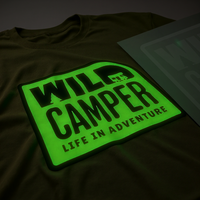
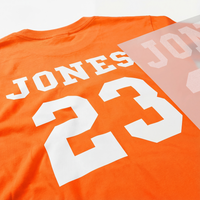










Are your custom apparel designs falling flat? If you're looking for a way to make your creations truly stand out in a crowded market, say hello to puff transfers— a game-changing option that lets you rise above the competition.
These innovative heat transfers add a distinctive raised effect to your designs, giving them a tactile, three-dimensional quality that catches attention. This article covers what they are, why they're fantastic, how to use them effectively, and some pro tips for creating successful puffed designs. Let's jump in and discover a new dimension of creativity.
Table of Contents
- What Are Puff Transfers?
- What's So Great About Puff?
- Limitations of Puff
- Colors Available
- Art Prep Instructions
- Application Instructions
- Pro Tips
- Conclusion

What are puff transfers?
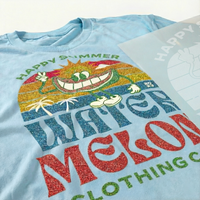
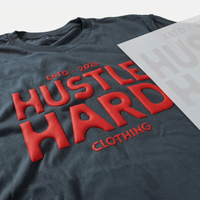
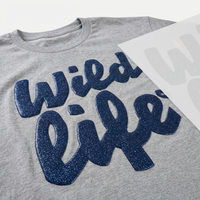
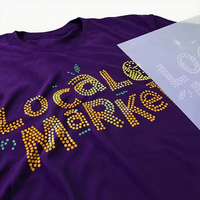
Puff transfers are a special type of screen-printed heat transfer that creates a distinctive raised effect on your garments. Unlike standard transfers that lay flat on the fabric, puff transfers pop off the surface, adding depth and texture to your designs. The result is a smooth, naturally rounded feel without harsh edges, creating a unique tactile experience that tends to impress.
How does this magic happen? A special additive is mixed into the ink before printing the transfer films. When exposed to heat during the application process, this additive expands, causing the ink to rise and create that coveted puffy effect. This reaction transforms simple, flat designs into eye-catching, three-dimensional prints.
What's so great about puff?
People love puff transfers for their unique texture and visual appeal. This special effect elevates your designs, giving them a premium, three-dimensional appearance that stands out. The raised surface catches the light in interesting ways, adding depth and character to even the simplest designs. Plus, puff transfer colors are highly opaque, ensuring your artwork looks vibrant against any fabric color.
Puff transfers for brands and business
From a business perspective, puff transfers are perfect for retail, brands, and fashion-forward apparel. They offer a perceived higher value that can command premium pricing.
Where puff looks best
Puff transfers work exceptionally well with larger text and solid, simple designs, making them ideal for bold logos and slogans. You can combine puff transfers with full-color DTF transfers for truly spectacular results—giving you the best of both worlds: intricate, full-color designs with eye-catching raised elements.

Limitations of puff
While puff transfers offer unique advantages, it's important to understand their limitations before using them effectively. Here are some key points to keep in mind when working with puff transfers:
- Color options are limited to one or two colors per design. If using two colors, only one can be puffed. The second color will be a standard, non-puff ink.
- Not recommended for fine lines or intricate designs. The puff effect works best with bold, simple graphics. Detailed artwork may lose definition when puffed.
- Does not support gradients, halftones, or photographic imagery. Puff transfers are best suited for solid colors and shapes.
- The artwork requirements are more stringent. Minimum line weight is 2 points, and minimum negative space thickness is equivalent to 4 points.
Colors available
We offer a vibrant range of colors for your puff transfer designs. Here's a breakdown of our color options:
Color options overview
|
Puff Colors (1-Color and 2-Color Designs) |
Additional Flat Colors (2-Color Designs) |
|
|

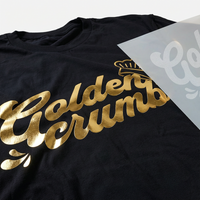
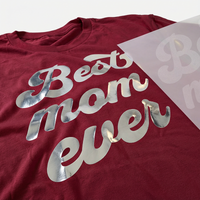
For two-color designs, you can choose one puff color and one flat color. The metallic silver and gold options add an extra touch of sophistication for creating eye-catching logos or special event merchandise.
Art prep instructions
Creating the perfect puff transfer starts with properly prepared artwork. Follow these steps in your design software to ensure your designs are ready.
1) Choose the right file format
- Recommended formats (vector): PDF, AI, EPS, SVG
- Other acceptable formats (raster): PSD, JPG, PNG, TIFF
- Note: All files are reviewed to ensure they meet our printing specifications
- Learn more about the difference between vector and raster files
2) Set the correct size
- Submit your artwork at the exact size you want it to print
- Make sure any raster files are 200–300 DPI at full size
- No need to upload your artwork in “Mirror Image” — we handle that
3) If you’re doing two colors, separate them cleanly
- Submit artwork with 2 colors that do not touch or overlap
- Clearly indicate which color should be puff and which should be flat
- Reminder: puff expands during application and can distort nearby flat color areas
4) Convert text to outlines
- Ensure all fonts are converted to non-editable vectors
- This prevents font substitution issues during production
5) Meet minimum line/spacing requirements
- Minimum line weight: 2 points
- Minimum negative space thickness: equivalent to 4 points
- For best results, avoid fine details and small text
6) Keep designs bold and simple
- Puff transfers work best with bold, simple designs
- Avoid intricate details, gradients, and photographic elements
7) Consider combining puff with DTF
- Use standard DTF for detailed or full-color elements
- Use puff for accents, logos, or text to create a layered, dimensional look

Application instructions
Applying puff transfers is straightforward, but attention to detail is key. Follow these steps and pro tips to ensure your puff transfers look fantastic every time.
Basic application steps
- Set your heat press to 350°F (177°C)
- Set pressure to medium
- Place your garment on the heat press
- Position your puff transfer on the garment
- Press for 7 seconds
- Peel the transfer paper hot (immediately after pressing)
Pro tips
Pro tips for perfect application
- Pre-press your garment: Press for 6–8 seconds to remove moisture and smooth the print area.
- Skip the cover sheet: Puff needs more direct heat to activate properly.
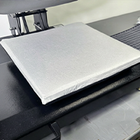
- Remove the platen cover: Give the puff ink room to expand during application.
- Smooth, even peel: Peel in one consistent motion for the cleanest result.
- No second press: Puff transfers do not require (or benefit from) a second press.
How to combine puff with DTF (same garment)
- Apply the DTF transfer first (using standard DTF application instructions)
- Allow to cool completely, then peel the DTF transfer
- Position the puff transfer and apply using the puff instructions above
- Adjust heat press settings between applications as needed
Watch our step-by-step 3D Puff Transfer pressing instructions
Elevate your designs with puff transfers
Puff transfers offer a unique way to make your custom apparel stand out. Their raised effect and vibrant colors add a premium touch that can increase the value of your products. While they work best with bold, simple designs, the range of 16 puff colors and 13 additional flat colors for 2-color designs gives you plenty of creative freedom.
Remember: proper artwork preparation and careful application are crucial for the best results. As you gain experience, try experimenting with combinations of puff and DTF transfers for eye-catching, multi-dimensional designs.
Start simple, follow the guidelines above, and reach out if you need help with artwork setup or project planning. If you need high-quality blank apparel, Ninja Blanks has you covered. When you're ready to watch your designs rise above the rest, use puff transfers and give your customers something they can feel excited about.


